


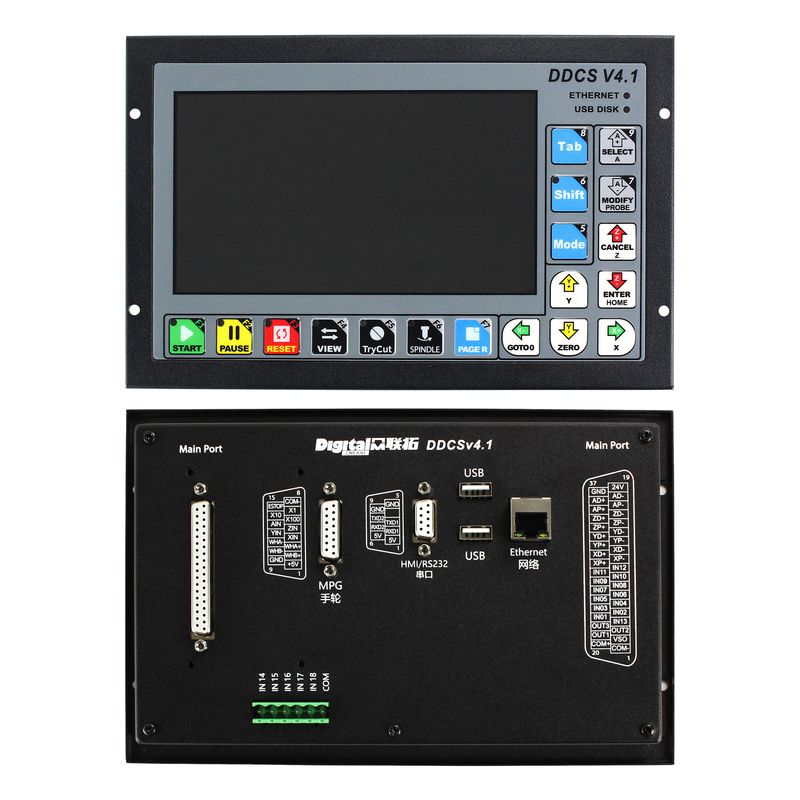


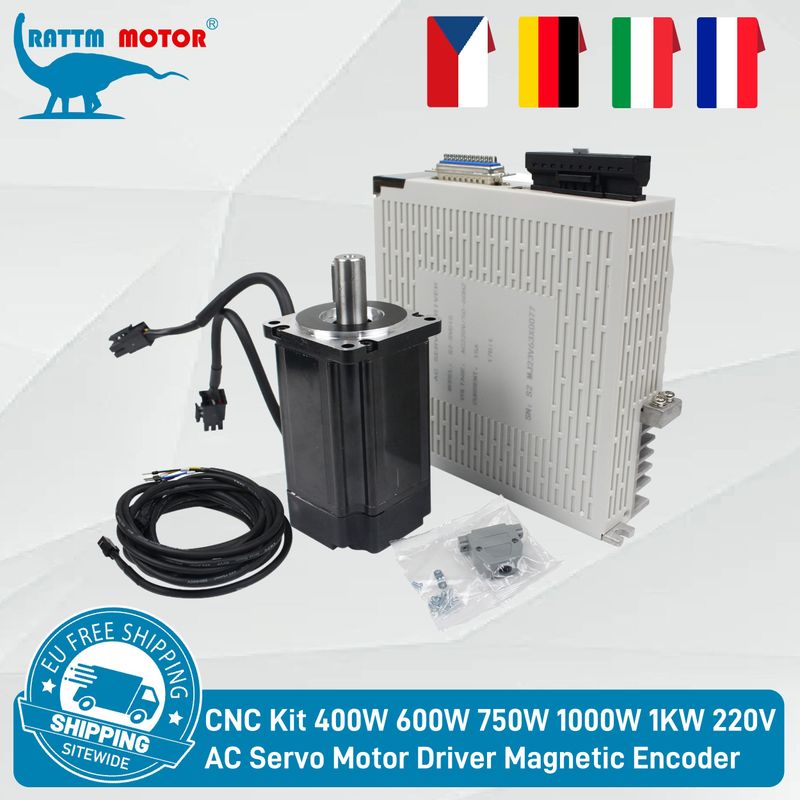


【EU Store】4 Axis G Code CNC Controller Offline DDCS V4.1 for Engraving Machine +4 Axis E-Stop MPG Manual Pulse Generator & 400W 600W 750W 1000W 1KW 220V AC Servo Stepper Motor Driver
Includes all taxes
Meet your Seller
-
$1,151.35Sold by BILLIONS BIRDS
Description

Note:
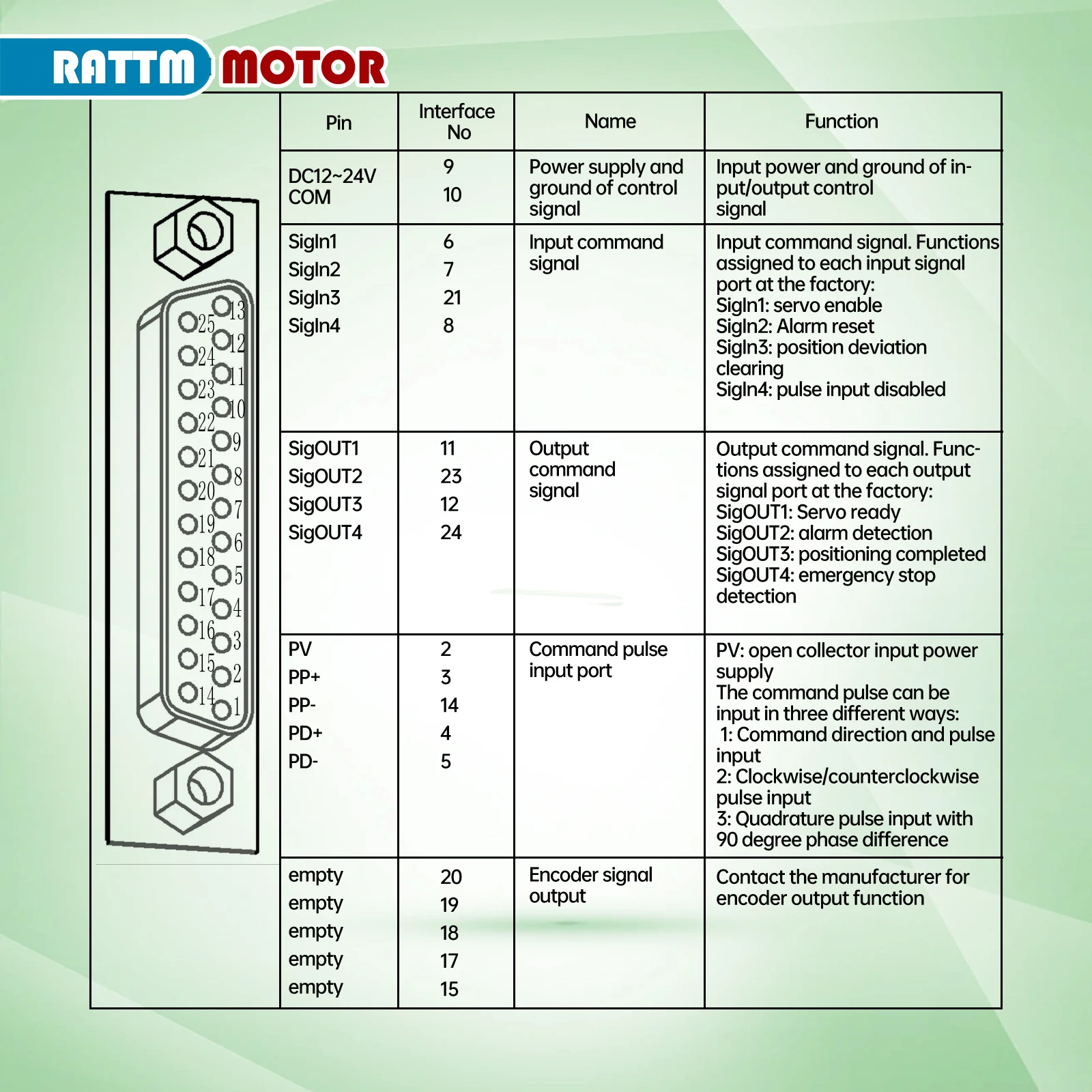
The default motor kit does not have a CN1 interface. If you need this feature, please contact us in advance before purchasing.
2 options:
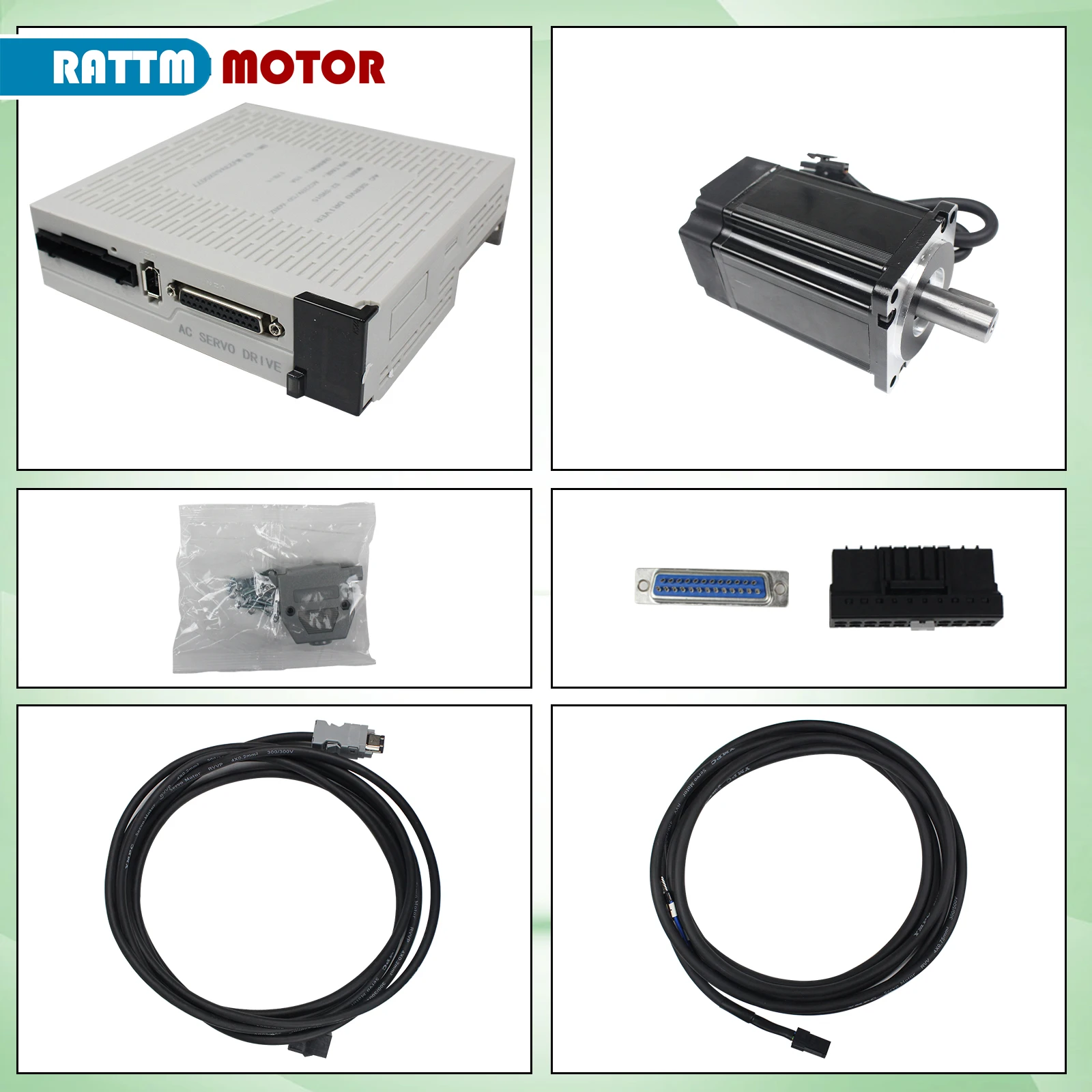
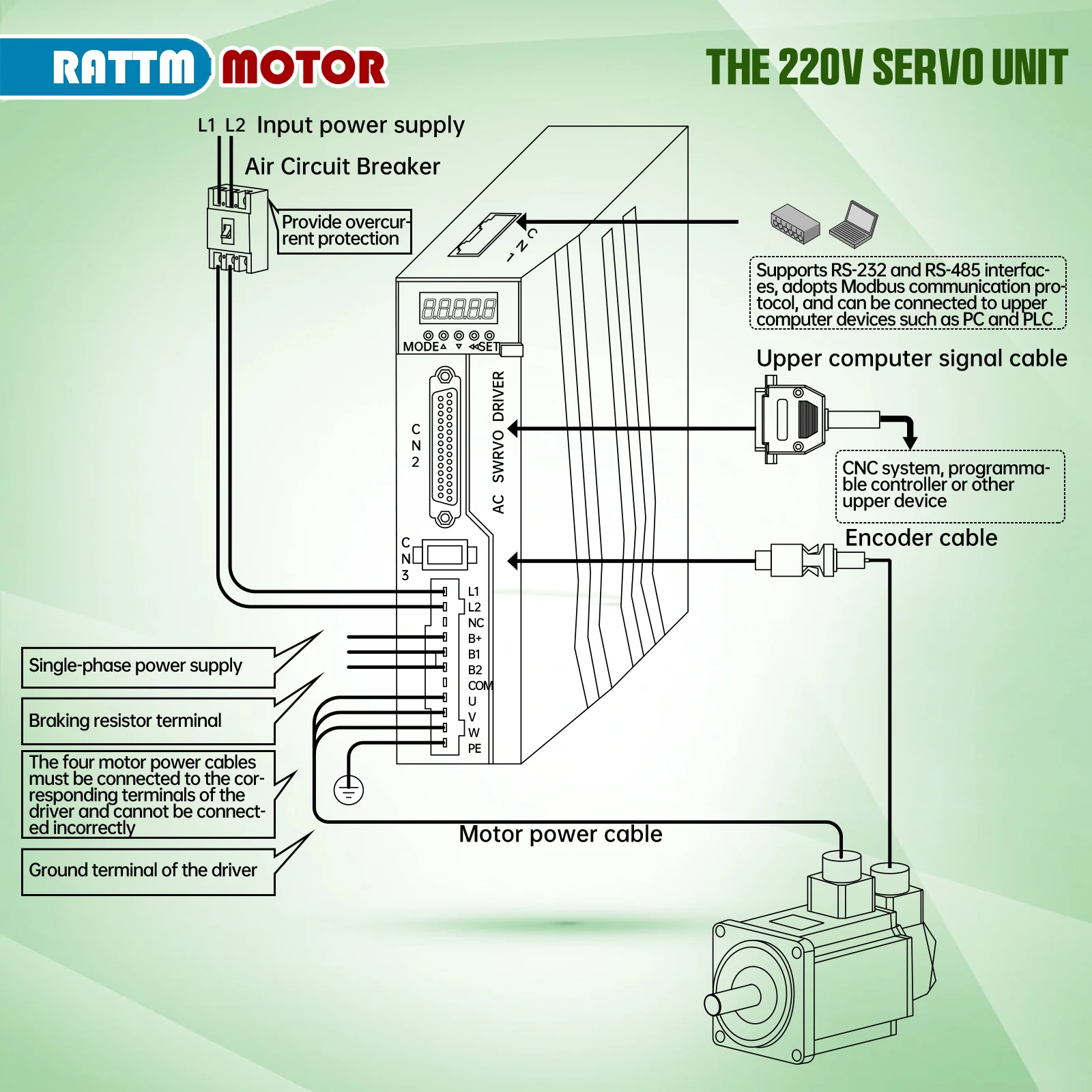
3 axis kit Package including:
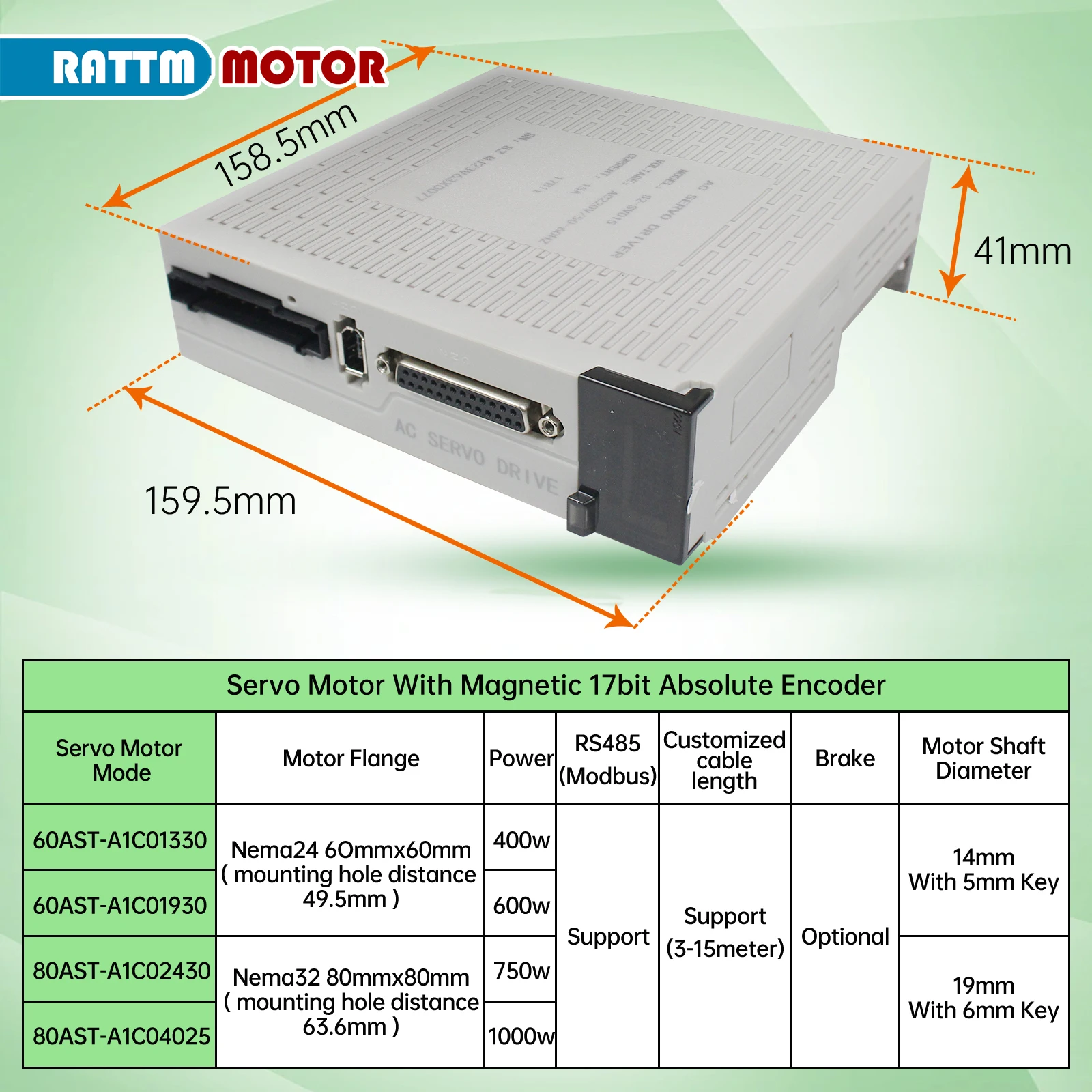
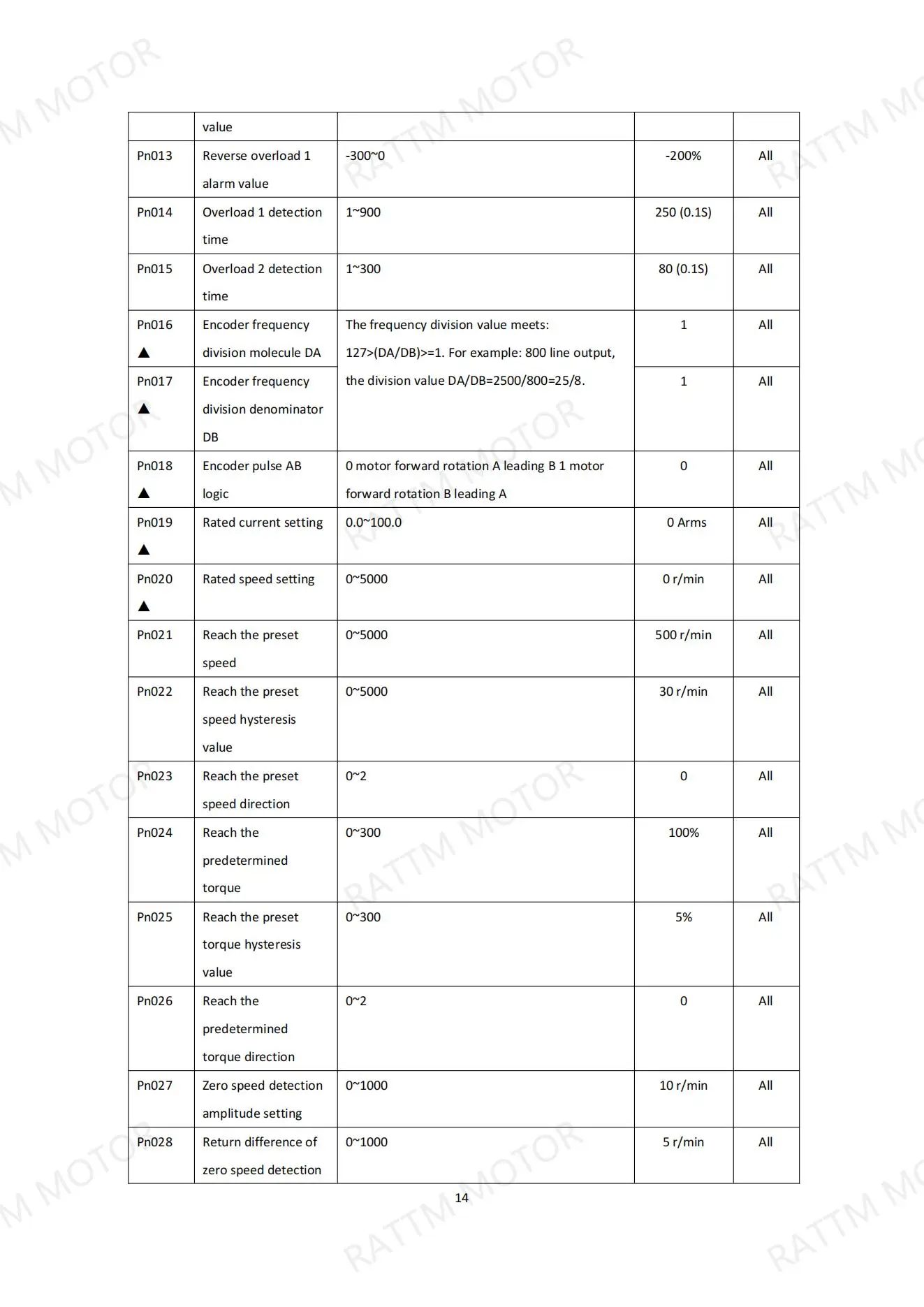
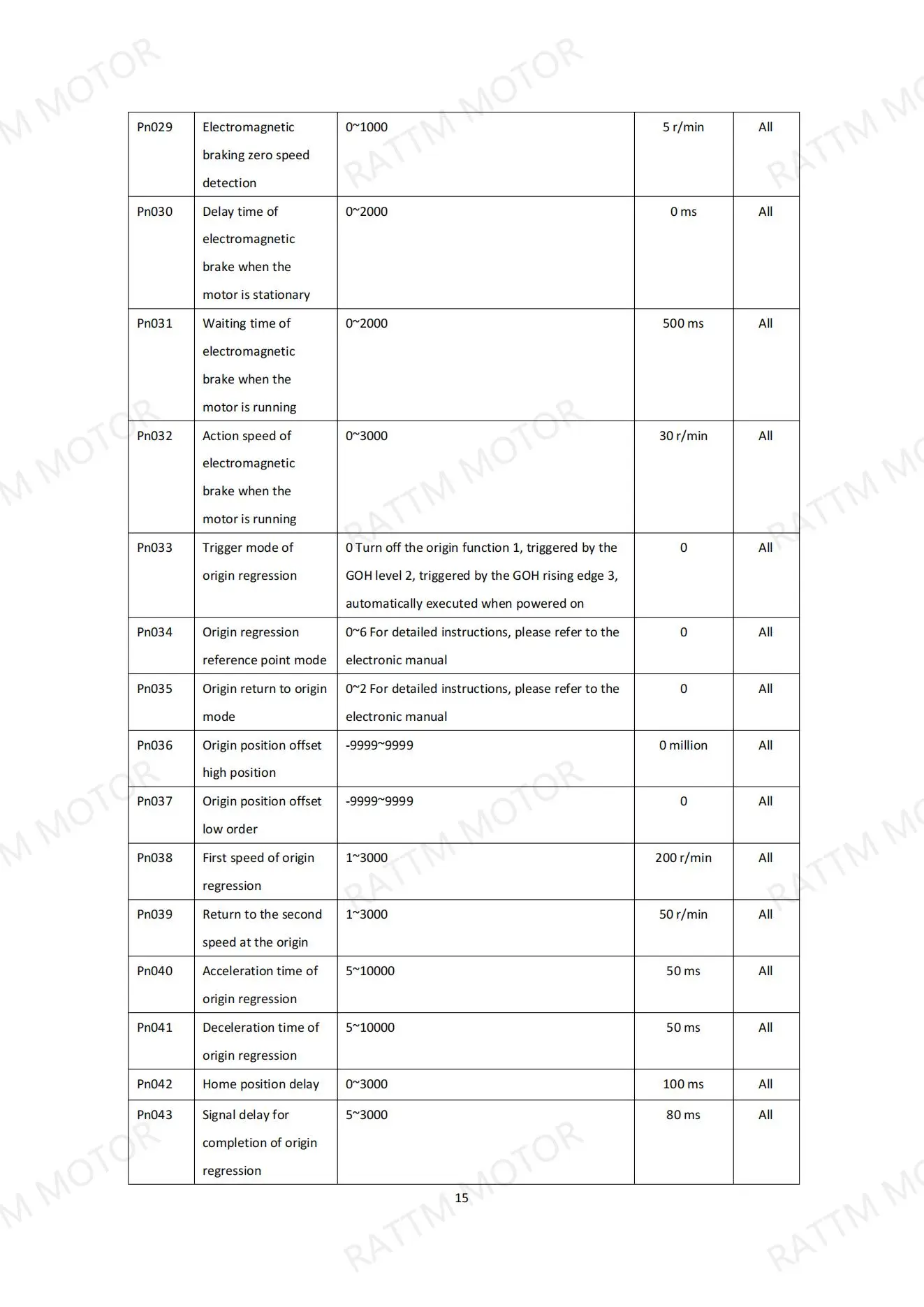
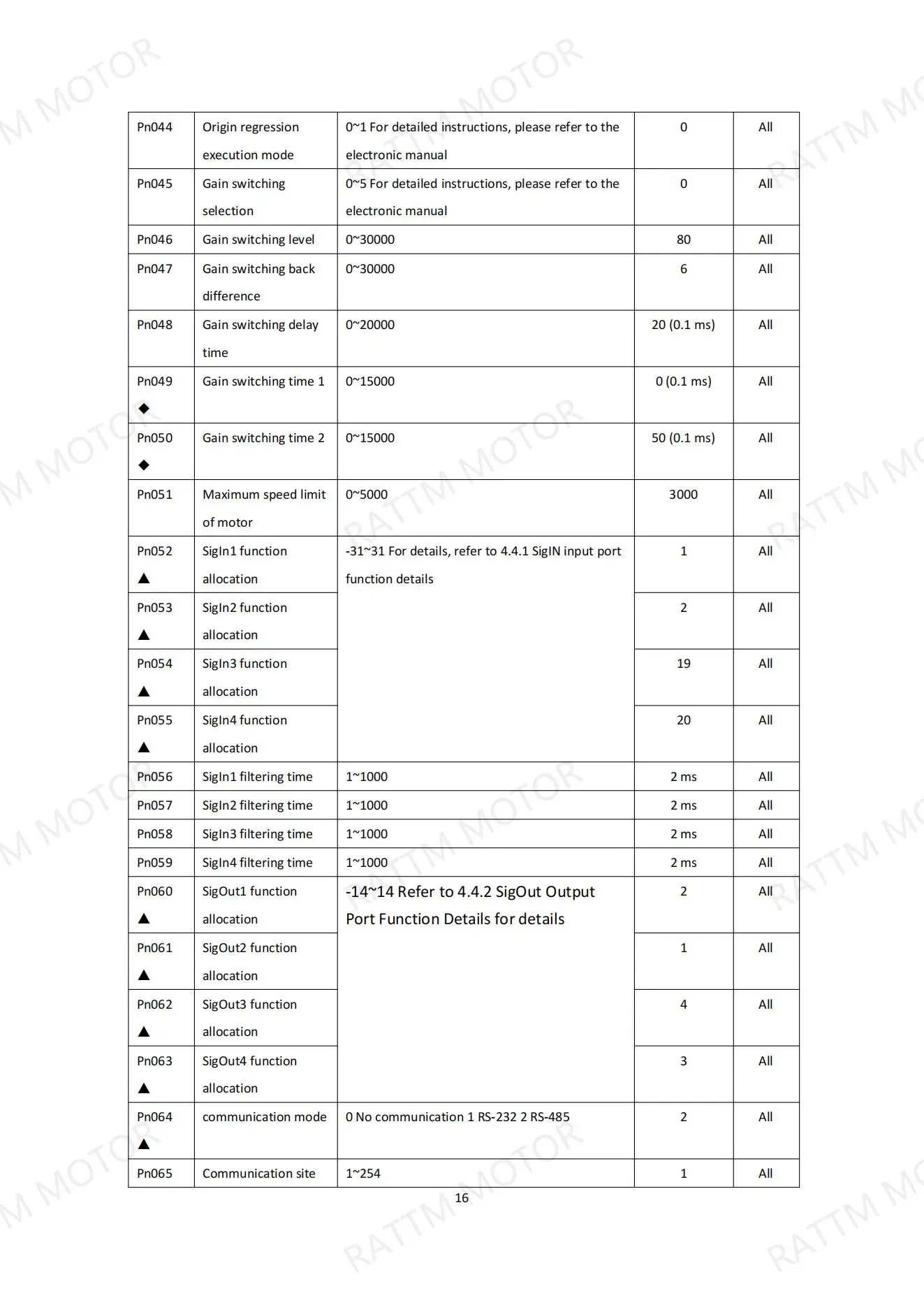
3 x 400W-1000W (with or without brake)
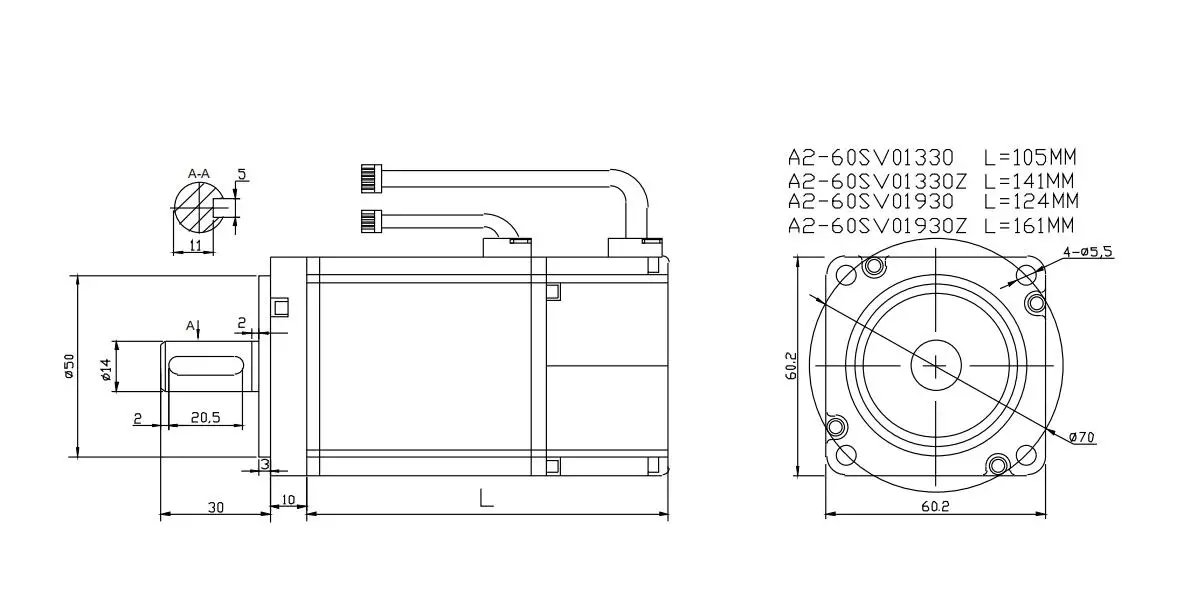
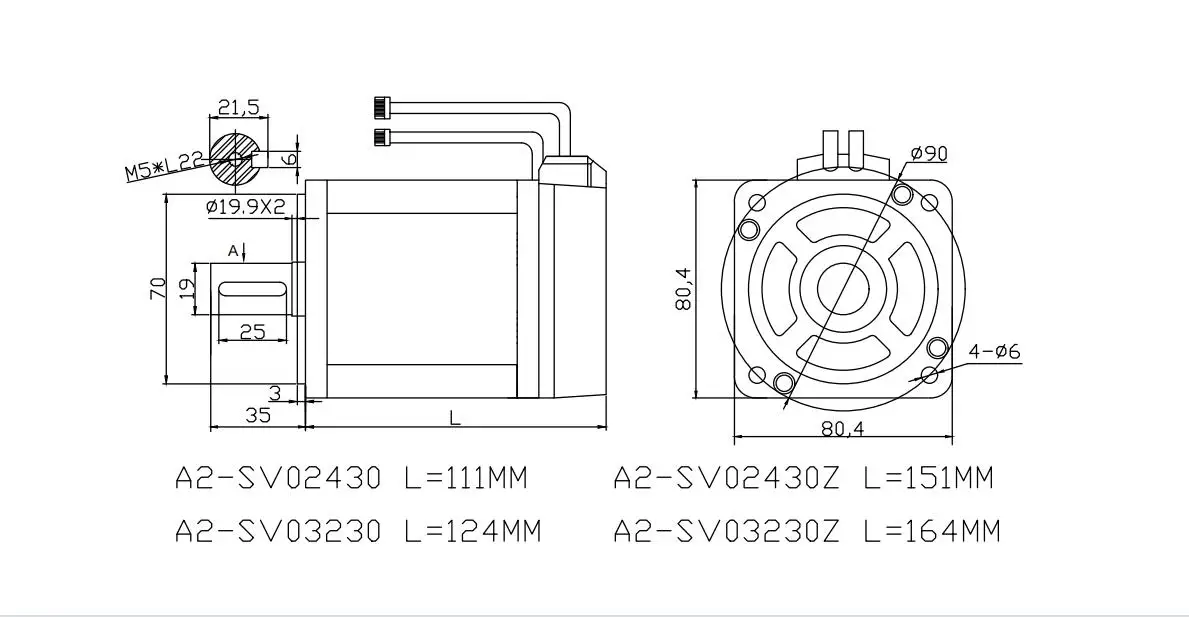
3 x A2M-60SV AC servo motor
3 x S2-SVD15 AC servo driver
3 x 3m power cable
3 x3m encoder cable
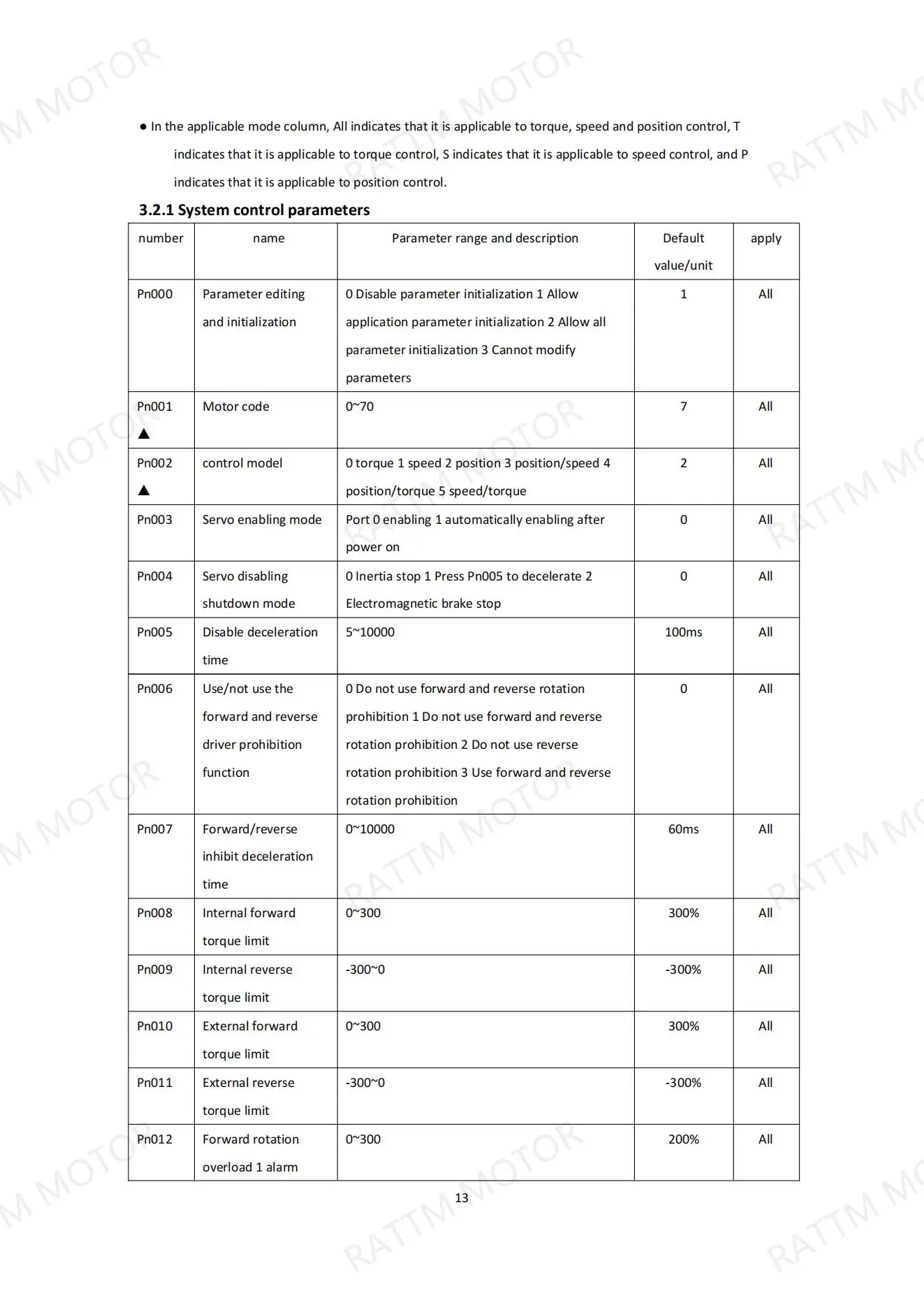
English manual will send to your email.
4 axis kit Package including:4 x 400W-1000W (with or without brake)
4 x A2M-60SV AC servo motor
4 x S2-SVD15 AC servo driver
4 x 3m power cable
4 x3m encoder cable
English manual will send to your email.
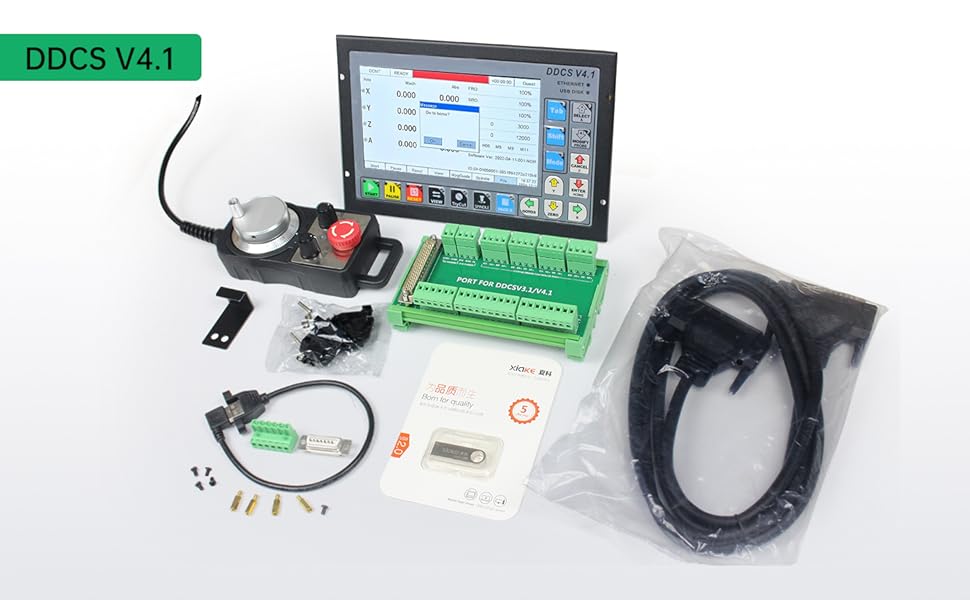
Introduction
The DDCS V4.1 4 axis motion controller for stepper and servo system, is updated from DDCS V3.1 on software and hardware. It combines great advancement with tiny footprint of each days from past 8 years.
The DDCS numerical control system adopts the ARM + FPGA design framework. ARM controls the human-computer interface and G-code analysis and the FPGA provides the underlying algorithms and creates the control pulse.
This ensure reliable control and easy operation. The internal operating system is Linux based.
The panel layout structure of the DDCS V4.1 is very rational to save space. All operations are controlled by only 17 keys and the keys are composite keys that can act as function keys or numeric keys. DDCS V4.1 support comprehensive Fanuc G code set.
The DDCS can be used for many styles and types of CNC machines. Lathes, Routers, Pick&Place and Mills are just a few examples. The DDCS operates as a Stand Alone system without the need of a computer. This ensure high precision, accuracy and reliability. The interface, even though very comprehensive, can be learned in a very short time.
DDCSV4.1 Brief technical features
1) 18 photoelectric isolated digital inputs,3 photoelectric isolated digital outputs.
2) The spindle can be set as Analog spindle(0~10V) and also Servo spindle.
3) 3-4 axes motor Control. Difffferential Mode and Double Pulse Mode output signal for optional, Maximum interpolation pulse output frequency is 500Khz/Axis, 2-4 Axis linear interpolation, any 2 axis circular interpolation;
4) ARM9 main control chip,FPGA core algorithm chip.
5) 7 inches TFT screen, Size: 1024x600 Pixels, Resolution:72 Pixels/Inch; 17 operation keys.
6) The Power Supply for IO Port is 24VDC,minimum current is 0.5A, the Power Supply for Control ler system is also 24VDC,minimum current is 0.5A. Controller needs both power to work properly.
7) USB flflash disk support for G code fifile input; Can transfer the fifiles by Ethernet communication between the computer and DDCS V4.1 controller; No size limited of the G-code fifile.
8) Compatible with standard G-code, support popular CAD/CAM software, such as ArtCam, MasterCam, ProE, JDSoft SurfMill, Aspire, Fusion 360 and so on;
9) Support standard MPG.
10) Support function of“ Try cutting” (handwheel guiding) function. the distance.
DDCS V4.1 the new features comparing with DDCS V3.1
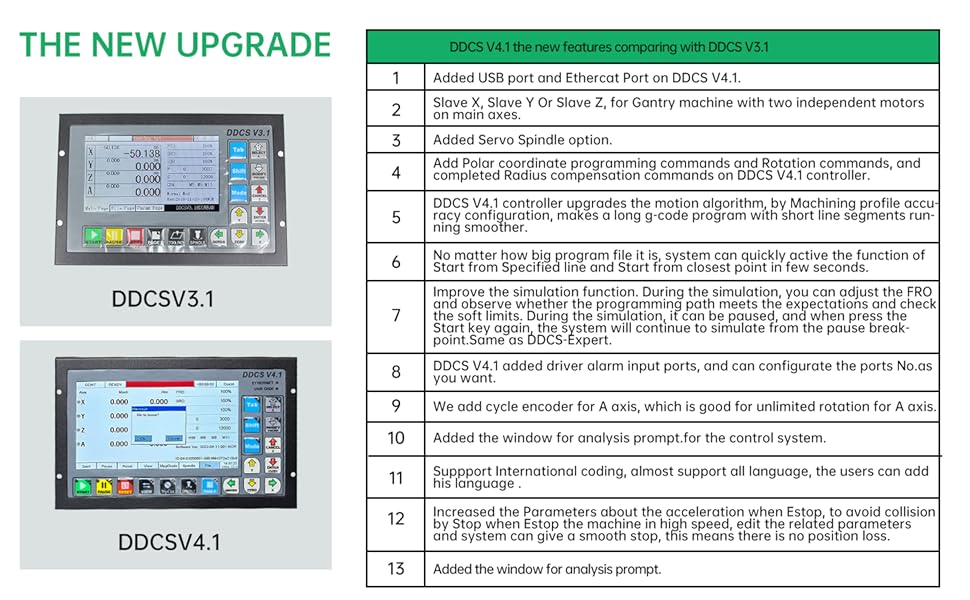
More functions
11)Support Jog function for each axis (continuous, step, defifined distance), Customer can defifine
12)Support Float Probe, Fix Probe, Vertex Probe and Tool Length Measurement.
13) Support the operation of quickly go to specify line and closest position. cal machining.
14) Support Array Machining, Sequence Machining, Milling Plane Machining, and Milling sylindri-
15) Support Bias for XYZA axis, and can defifind the Bias distance.
16) Support Pause breakpoint, Power-Cut Recovery Beakpoint and loaded breakpoint; And Support Start from the specifific line and closest line.
17) Support Multiple origin points operation, the users can create an origin point and load it.
18) Support Find Middle for X and Y axis.
19) Improved the simulation function. During the simulation, you can adjust the FRO and observe whether the programming path meets the expectations and check the soft limits. During the simulation, it can be paused, and when press the Start key again, the system will continue to simulate from the pause breakpoint.
20) Slave X, Slave Y Or Slave Z, for Gantry machine with two independent motors on main axes.
21) Now English and Chinese language is avaliable; System also suppport International coding, almost support all language, the users can add their own language to the control system.
22) DDCS V4.1 Only Supports NPN Type Limited Switch.
23) Support 4 kinds operation rights: visitor, operator, admin, super admin.
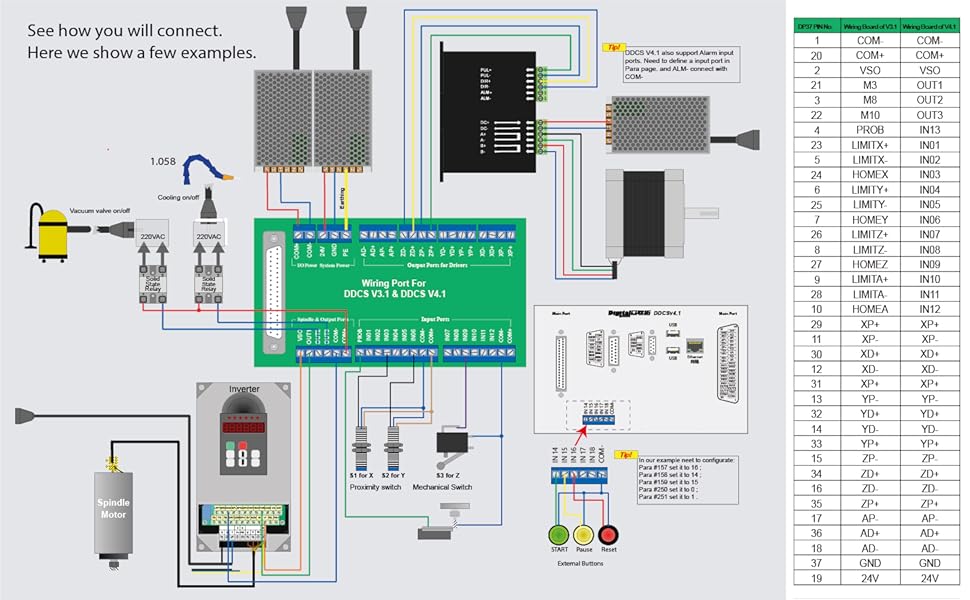
Needs two power supplies
COM+ and COM- is the power input ports for Input/Output Port and MPG, 24V and GND is the power input ports for controller system. Please keep in mind,only when the two power supplies are connected correctly the controller can be work properly.
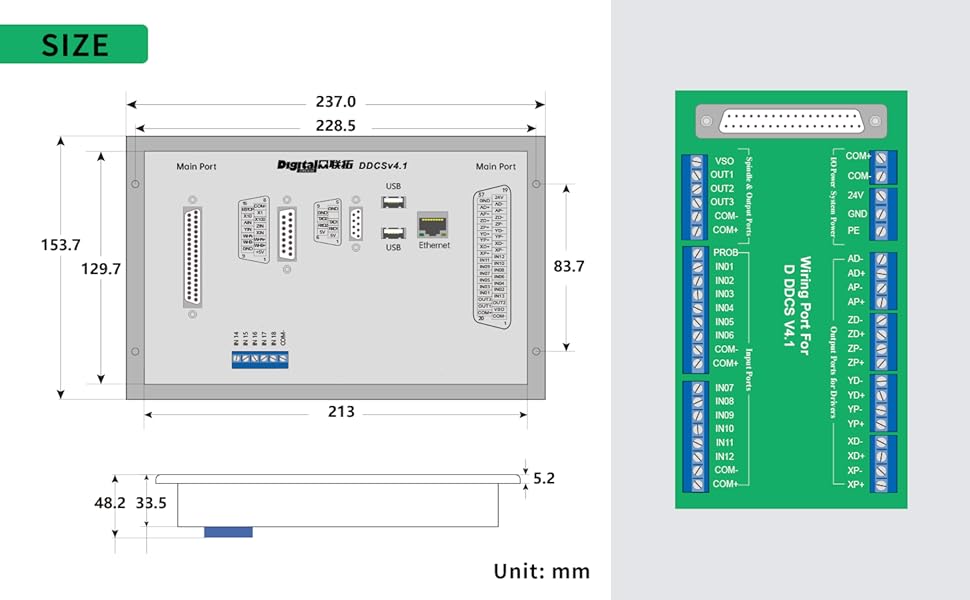
The DDCS V4.1 is a small box that can fit in a window of a small control box or control cabinet.
Four locking hooks fix this controller from the frame. The dimension you find in Figure 1-3.
The front panel is 237mm * 153.7mm * 5.2mm;
The main body is 237mm * 153.7mm * 48.2mm;
To mount the unit in an equipment cabinet, cut the hole 228.5mm * 83.7mm
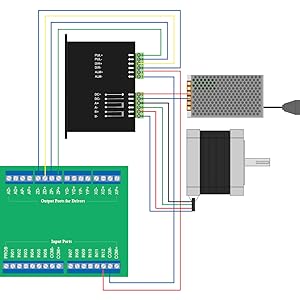
DDCS V4.1 Stepper/Servo Control Output
The stepper/servo control output,we cite differential Pulse and Direction output method.By the Para #012~015, the users can configurate the drive mode for the 4 axis.
Max. output frequency is 500Khz, please take attention to the max. pluse input frequency of the driver.
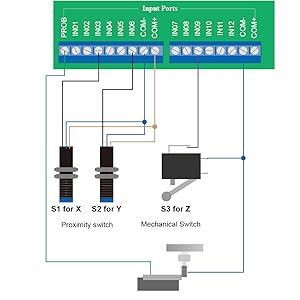
Limit, Home and Probe Inputs
The digital input circuit has the mechanical limit switch connection method and the open collector of the triode connection method. It supports the NPN type proximity limit switch.
The example above, we already set at Submenu “Input signal Para” in the Parameters page as:
#151: X axis Home port is 03, then IN03 is the X axir home signal input port;
#152: Y axis Home port is 06, then IN06 is the Y axir home signal input port;
#153: Z axis Home port is 09, then IN09 is the Y axir home signal input port.
#156: Probe Port is 13, then IN13 is the probe signal input port.

Extended Function Inputs
#250~#253 Extended function key functions: 0 "Start"; 1 "Pause"; 2 "XY Zero"; 3 "Z Zero"; 4 "Home"; 5 "Floatting probe"; 6 "Fixing probe"; 7 "Vertex probe"; 8 "X 1/2"; 9 "Y 1/2; 10 "extkey1.nc"; 11 "Disable". The users can select the function as they want.
Take the example, how to defind the “Start”, “Pause” and “E-stop”Extended function to the external keys.
By Submenu “Input signal Parameters” in the Parameters page:
Set “#157 External emergency stop port” to No. 16 input port; Set “#158 Extended Function Key 1 Port” to No. 14 input port; “#159 Extended Function Key 1 Port” to No. 15 input port.
Then set #250 to 0, then define input port 14 as “Start”; Set # 251 to 1, to defind the input port 15 as the "Pause".
The users also can edit Macro to self-define the external key function by “extkey.nc“.
The appendix also includes a list of macro definitions.
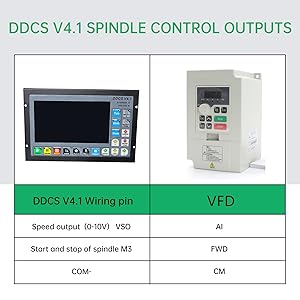
DDCSV4.1 Spindle control outputs
DDCS V4.1 Support 2 kinds Spindle Mode: Analog Spindle / Servo Spindle (PUL+DIR). By Para #188 configurate the spindle as Analog or Servo Spindle, By Para #189 we select the servo spindle channel. Here we take the example of the analog spindle.
The spindle control output ports (OUT01-OUT03) offer connections for Start and Stop of the Spindle (M3/M5), Start/Stop of Cooling (M8/M9), Start/Stop of Lubrication (M10/M11). These three output terminals are signals open to ground. The highest electric current can be absorbed is 50mA. The speed controlling output terminal can output 0-10V. It can adjust the speed of the spindle motor by sending the voltage between 0 and 10V to the VFD according the the Spindle Speed Setting.
The above Figure shows the wiring with Sunfar VFD.
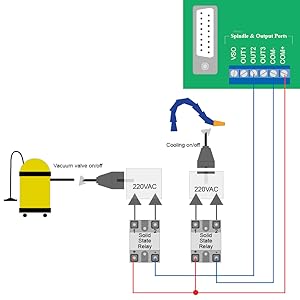
DDCSV4.1 output ports wiring with relay
OUT0-OUT3 can be used as General comman output ports, for example, can be used as the solid relay output ports, take the example of the figure above.
After Wiring, in the View page, we can check the wiring situation.
The related Parameter settings:
In the Parameter Page, the Sub-menu “Output signal Para”, we can configurate the output number of M3/M5, M8/M9, M10/M11 and the electrical level.
In the Parameter Page, the Sub-menu “M output code Para”, we can set the delay time of M3/M4,M8/M9 and M10/M11.
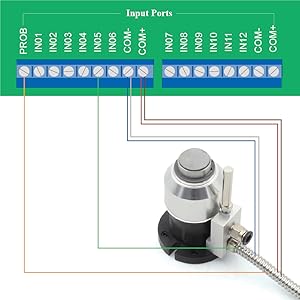
Probe Input ports
We configurate the IN13 as the Probe signal input port, and IN05 as the Z-- hard limit signal input port. Then wiring as above.
After completing the wiring, we can check the input ports status at the View page.
In the Sub-menu “Home Para” of the Paramters page, we can set the Home direction of each axis, the Home Speed, the back-distance and so on. And comparing with DDCS V3.1, the 4.1 version controller added the coordinate setting of the 4 references points.
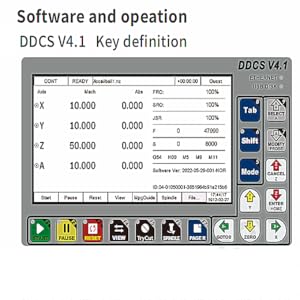
Key definition
"Shift" key can be defined as "Menu" or "2nd function" by parameter #313, among which the menu function is the newly added content of DDCS V4.1.
DDCS V4.1 has added many functions,only 17 keys is not enough, so we defined the "Start" and other keys totally 7 keys to be composite keys, and namely F1-F7, which can be Perform corresponding operations accord ing to the on-screen prompts.
This column shows the mechanical coordinate value of each axis,the display range is -99999.999~+99999.999,the precision is 0.001.
Please note the current unit is in metric or imperial.The default is metric,we can edit it in Parameter #001.
System FPGE cited 32 -bit speed generator, with higher resolution for the speed / acceleration.
Suppport International coding,almost support all language, the users can add his language for the control system.
No matter how big program file it is,system can quickly active the function of start from specified line and start from closest point in few seconds.
PG
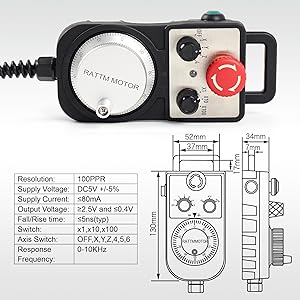
The CNC 4 Axis handheld controller MPG Pendant with x1, x10, x100 selectable, with Emergency stop for 4 axis CNC machine
It equipped with our popular machined MPG unit with 4 axis and scale selector,LED indicator also send feed back from the CNC machine to user about the status of the unit.
This handwheel comes with a plug,so it's "Plug and play"
Feature
x1, x10, x100 switch
X,Y,Z,4th axis selector switch
LED indicator
With Emergency stop
Extendable high quality shielded cable cord
Magnetic base holder can place anywhere on the machine steel surface
Required 5V+, 150mA, power for MPG
Resolution:100PPR
Supply Current:≤80mA
Response Frequency:0-10KHz

3 x 400W-1000W (with or without brake)
3 x A2M-60SV AC servo motor
3 x S2-SVD15 AC servo driver
3 x 3m power cable
3 x3m encoder cable
English manual will send to your email.
3 x 400W-1000W (with or without brake)
3 x A2M-60SV AC servo motor
3 x S2-SVD15 AC servo driver
3 x 3m power cable
3 x3m encoder cable
English manual will send to your email.
3 x 400W-1000W (with or without brake)
3 x A2M-60SV AC servo motor
3 x S2-SVD15 AC servo driver
3 x 3m power cable
3 x3m encoder cable
English manual will send to your email.
3 x 400W-1000W (with or without brake)
3 x A2M-60SV AC servo motor
3 x S2-SVD15 AC servo driver
3 x 3m power cable
3 x3m encoder cable
English manual will send to your email.
3 x 400W-1000W (with or without brake)
3 x A2M-60SV AC servo motor
3 x S2-SVD15 AC servo driver
3 x 3m power cable
3 x3m encoder cable
English manual will send to your email.
3 x 400W-1000W (with or without brake)
3 x A2M-60SV AC servo motor
3 x S2-SVD15 AC servo driver
3 x 3m power cable
3 x3m encoder cable
English manual will send to your email.
3 x 400W-1000W (with or without brake)
3 x A2M-60SV AC servo motor
3 x S2-SVD15 AC servo driver
3 x 3m power cable
3 x3m encoder cable
English manual will send to your email.
3 x 400W-1000W (with or without brake)
3 x A2M-60SV AC servo motor
3 x S2-SVD15 AC servo driver
3 x 3m power cable
3 x3m encoder cable
English manual will send to your email.
4 axis kit Package including:4 x 400W-1000W (with or without brake)
4 x A2M-60SV AC servo motor
4 x S2-SVD15 AC servo driver
4 x 3m power cable
4 x3m encoder cable
English manual will send to your email.
4 axis kit Package including:4 x 400W-1000W (with or without brake)
4 x A2M-60SV AC servo motor
4 x S2-SVD15 AC servo driver
4 x 3m power cable
4 x3m encoder cable
English manual will send to your email.
4 x 400W-1000W (with or without brake)
4 x A2M-60SV AC servo motor
4 x S2-SVD15 AC servo driver
4 x 3m power cable
4 x3m encoder cable
English manual will send to your email.
4 x 400W-1000W (with or without brake)
4 x A2M-60SV AC servo motor
4 x S2-SVD15 AC servo driver
4 x 3m power cable
4 x3m encoder cable
English manual will send to your email.
4 x 400W-1000W (with or without brake)
4 x A2M-60SV AC servo motor
4 x S2-SVD15 AC servo driver
4 x 3m power cable
4 x3m encoder cable
English manual will send to your email.
Introduction
The DDCS V4.1 4 axis motion controller for stepper and servo system, is updated from DDCS V3.1 on software and hardware. It combines great advancement with tiny footprint of each days from past 8 years.
The DDCS numerical control system adopts the ARM + FPGA design framework. ARM controls the human-computer interface and G-code analysis and the FPGA provides the underlying algorithms and creates the control pulse.
This ensure reliable control and easy operation. The internal operating system is Linux based.
The panel layout structure of the DDCS V4.1 is very rational to save space. All operations are controlled by only 17 keys and the keys are composite keys that can act as function keys or numeric keys. DDCS V4.1 support comprehensive Fanuc G code set.
The DDCS can be used for many styles and types of CNC machines. Lathes, Routers, Pick&Place and Mills are just a few examples. The DDCS operates as a Stand Alone system without the need of a computer. This ensure high precision, accuracy and reliability. The interface, even though very comprehensive, can be learned in a very short time.
DDCSV4.1 Brief technical features
1) 18 photoelectric isolated digital inputs,3 photoelectric isolated digital outputs.
2) The spindle can be set as Analog spindle(0~10V) and also Servo spindle.
3) 3-4 axes motor Control. Difffferential Mode and Double Pulse Mode output signal for optional, Maximum interpolation pulse output frequency is 500Khz/Axis, 2-4 Axis linear interpolation, any 2 axis circular interpolation;
4) ARM9 main control chip,FPGA core algorithm chip.
5) 7 inches TFT screen, Size: 1024x600 Pixels, Resolution:72 Pixels/Inch; 17 operation keys.
6) The Power Supply for IO Port is 24VDC,minimum current is 0.5A, the Power Supply for Control ler system is also 24VDC,minimum current is 0.5A. Controller needs both power to work properly.
7) USB flflash disk support for G code fifile input; Can transfer the fifiles by Ethernet communication between the computer and DDCS V4.1 controller; No size limited of the G-code fifile.
8) Compatible with standard G-code, support popular CAD/CAM software, such as ArtCam, MasterCam, ProE, JDSoft SurfMill, Aspire, Fusion 360 and so on;
9) Support standard MPG.
10) Support function of“ Try cutting” (handwheel guiding) function. the distance.
DDCS V4.1 the new features comparing with DDCS V3.1
More functions
11)Support Jog function for each axis (continuous, step, defifined distance), Customer can defifine
12)Support Float Probe, Fix Probe, Vertex Probe and Tool Length Measurement.
13) Support the operation of quickly go to specify line and closest position. cal machining.
14) Support Array Machining, Sequence Machining, Milling Plane Machining, and Milling sylindri-
15) Support Bias for XYZA axis, and can defifind the Bias distance.
16) Support Pause breakpoint, Power-Cut Recovery Beakpoint and loaded breakpoint; And Support Start from the specifific line and closest line.
17) Support Multiple origin points operation, the users can create an origin point and load it.
18) Support Find Middle for X and Y axis.
19) Improved the simulation function. During the simulation, you can adjust the FRO and observe whether the programming path meets the expectations and check the soft limits. During the simulation, it can be paused, and when press the Start key again, the system will continue to simulate from the pause breakpoint.
20) Slave X, Slave Y Or Slave Z, for Gantry machine with two independent motors on main axes.
21) Now English and Chinese language is avaliable; System also suppport International coding, almost support all language, the users can add their own language to the control system.
22) DDCS V4.1 Only Supports NPN Type Limited Switch.
23) Support 4 kinds operation rights: visitor, operator, admin, super admin.
Needs two power supplies
COM+ and COM- is the power input ports for Input/Output Port and MPG, 24V and GND is the power input ports for controller system. Please keep in mind,only when the two power supplies are connected correctly the controller can be work properly.
The DDCS V4.1 is a small box that can fit in a window of a small control box or control cabinet.
Four locking hooks fix this controller from the frame. The dimension you find in Figure 1-3.
The front panel is 237mm * 153.7mm * 5.2mm;
The main body is 237mm * 153.7mm * 48.2mm;
To mount the unit in an equipment cabinet, cut the hole 228.5mm * 83.7mm
DDCS V4.1 Stepper/Servo Control Output
The stepper/servo control output,we cite differential Pulse and Direction output method.By the Para #012~015, the users can configurate the drive mode for the 4 axis.
Max. output frequency is 500Khz, please take attention to the max. pluse input frequency of the driver.
Limit, Home and Probe Inputs
The digital input circuit has the mechanical limit switch connection method and the open collector of the triode connection method. It supports the NPN type proximity limit switch.
The example above, we already set at Submenu “Input signal Para” in the Parameters page as:
#151: X axis Home port is 03, then IN03 is the X axir home signal input port;
#152: Y axis Home port is 06, then IN06 is the Y axir home signal input port;
#153: Z axis Home port is 09, then IN09 is the Y axir home signal input port.
#156: Probe Port is 13, then IN13 is the probe signal input port.
Extended Function Inputs
#250~#253 Extended function key functions: 0 "Start"; 1 "Pause"; 2 "XY Zero"; 3 "Z Zero"; 4 "Home"; 5 "Floatting probe"; 6 "Fixing probe"; 7 "Vertex probe"; 8 "X 1/2"; 9 "Y 1/2; 10 "extkey1.nc"; 11 "Disable". The users can select the function as they want.
Take the example, how to defind the “Start”, “Pause” and “E-stop”Extended function to the external keys.
By Submenu “Input signal Parameters” in the Parameters page:
Set “#157 External emergency stop port” to No. 16 input port; Set “#158 Extended Function Key 1 Port” to No. 14 input port; “#159 Extended Function Key 1 Port” to No. 15 input port.
Then set #250 to 0, then define input port 14 as “Start”; Set # 251 to 1, to defind the input port 15 as the "Pause".
The users also can edit Macro to self-define the external key function by “extkey.nc“.
The appendix also includes a list of macro definitions.
DDCSV4.1 Spindle control outputs
DDCS V4.1 Support 2 kinds Spindle Mode: Analog Spindle / Servo Spindle (PUL+DIR). By Para #188 configurate the spindle as Analog or Servo Spindle, By Para #189 we select the servo spindle channel. Here we take the example of the analog spindle.
The spindle control output ports (OUT01-OUT03) offer connections for Start and Stop of the Spindle (M3/M5), Start/Stop of Cooling (M8/M9), Start/Stop of Lubrication (M10/M11). These three output terminals are signals open to ground. The highest electric current can be absorbed is 50mA. The speed controlling output terminal can output 0-10V. It can adjust the speed of the spindle motor by sending the voltage between 0 and 10V to the VFD according the the Spindle Speed Setting.
The above Figure shows the wiring with Sunfar VFD.
DDCSV4.1 output ports wiring with relay
OUT0-OUT3 can be used as General comman output ports, for example, can be used as the solid relay output ports, take the example of the figure above.
After Wiring, in the View page, we can check the wiring situation.
The related Parameter settings:
In the Parameter Page, the Sub-menu “Output signal Para”, we can configurate the output number of M3/M5, M8/M9, M10/M11 and the electrical level.
In the Parameter Page, the Sub-menu “M output code Para”, we can set the delay time of M3/M4,M8/M9 and M10/M11.
Probe Input ports
We configurate the IN13 as the Probe signal input port, and IN05 as the Z-- hard limit signal input port. Then wiring as above.
After completing the wiring, we can check the input ports status at the View page.
In the Sub-menu “Home Para” of the Paramters page, we can set the Home direction of each axis, the Home Speed, the back-distance and so on. And comparing with DDCS V3.1, the 4.1 version controller added the coordinate setting of the 4 references points.
Key definition
"Shift" key can be defined as "Menu" or "2nd function" by parameter #313, among which the menu function is the newly added content of DDCS V4.1.
DDCS V4.1 has added many functions,only 17 keys is not enough, so we defined the "Start" and other keys totally 7 keys to be composite keys, and namely F1-F7, which can be Perform corresponding operations accord ing to the on-screen prompts.
This column shows the mechanical coordinate value of each axis,the display range is -99999.999~+99999.999,the precision is 0.001.
Please note the current unit is in metric or imperial.The default is metric,we can edit it in Parameter #001.
System FPGE cited 32 -bit speed generator, with higher resolution for the speed / acceleration.
Suppport International coding,almost support all language, the users can add his language for the control system.
No matter how big program file it is,system can quickly active the function of start from specified line and start from closest point in few seconds.
PG
The CNC 4 Axis handheld controller MPG Pendant with x1, x10, x100 selectable, with Emergency stop for 4 axis CNC machine
It equipped with our popular machined MPG unit with 4 axis and scale selector,LED indicator also send feed back from the CNC machine to user about the status of the unit.
This handwheel comes with a plug,so it's "Plug and play"
Feature
x1, x10, x100 switch
X,Y,Z,4th axis selector switch
LED indicator
With Emergency stop
Extendable high quality shielded cable cord
Magnetic base holder can place anywhere on the machine steel surface
Required 5V+, 150mA, power for MPG
Resolution:100PPR
Supply Current:≤80mA
Response Frequency:0-10KHz
Application:
Application areas: Industrial manipulator,Semiconductor equipment
Carving equipment,Measuring equipment,Medical equipment,robot and other
automated equipment on the market.Suitable for the following occasions
Repetitive
positioning control occasions; occasions with many input and output
points demand; networking communication applications.
Shop Policies
Payment Policy
Payment Policy – BILLIONS BIRDS
At BILLIONS BIRDS, we are committed to providing a safe, secure, and seamless payment experience for our customers.
1. Accepted Payment Methods
We accept the following payment options:
Major Credit & Debit Cards (Visa, MasterCard, American Express)
Secure Online Payment Gateways (such as PayPal, Stripe, or other providers available at checkout)
Any additional payment methods displayed during checkout
All payments must be completed in full at the time of purchase.
2. Secure Transactions
All transactions are processed through encrypted and secure payment systems to protect your personal and financial information. We do not store your full payment details on our servers.
3. Currency
Prices are displayed in the currency indicated on the website. If you are purchasing from another country, your bank may apply currency conversion fees.
4. Order Confirmation
Once your payment has been successfully processed, you will receive an order confirmation email containing your purchase details.
5. Failed or Declined Payments
If your payment is declined, please verify your billing information or contact your bank. Orders will only be processed after successful payment confirmation.
6. Fraud Prevention
BILLIONS BIRDS reserves the right to cancel or refuse any order if fraud or unauthorised activity is suspected.
Delivery Policy
Delivery Policy – BILLIONS BIRDS
At BILLIONS BIRDS, we are dedicated to delivering your orders safely and efficiently.
1. Order Processing
All orders are processed within 1–3 business days after payment confirmation. Orders are not processed or shipped on weekends or public holidays.
2. Shipping Times
Estimated delivery times vary depending on your location:
Domestic Shipping: 3–7 business days
International Shipping: 7–15 business days
Please note that delivery times are estimates and may vary due to customs procedures, carrier delays, weather conditions, or other unforeseen circumstances.
3. Shipping Costs
Shipping fees are calculated at checkout based on your location and selected shipping method. Any customs duties, taxes, or import fees are the customer's responsibility.
4. Tracking Information
Once your order has been shipped, you will receive a confirmation email with tracking details (if available) so you can monitor your package.
5. Delivery Issues
If your order is delayed, lost, or arrives damaged, please contact us within 7 days of the expected delivery date. We will work with the shipping carrier to resolve the issue as quickly as possible.
6. Incorrect Shipping Information
Customers are responsible for providing accurate shipping details at checkout. BILLIONS BIRDS is not responsible for orders shipped to incorrect addresses provided by the customer.
Refund Policy
Refund Policy – BILLIONS BIRDS
At BILLIONS BIRDS, customer satisfaction is our top priority. If you are not completely satisfied with your purchase, we’re here to help.
1. Return Eligibility
You may request a return within 14 days of receiving your order. To qualify for a return:
The item must be unused, unworn, and in the same condition as received.
The item must be in its original packaging.
Proof of purchase (order confirmation or receipt) is required.
Certain items may not be eligible for return, including clearance items, gift cards, or personalised/custom products.
2. Non-Refundable Items
The following items are non-refundable:
Final sale or discounted items
Gift cards
Items damaged due to misuse, negligence, or improper care
3. Return Process
To initiate a return, please contact our customer support team with your order number and reason for return. If your return is approved, you will receive instructions for returning the item.
Unless the item is defective or incorrect, customers are responsible for return shipping costs.
4. Refund Processing
Once we receive and inspect your returned item:
We will notify you of the approval or rejection of your refund.
If approved, the refund will be issued to your original payment method within 5–10 business days.
Please note that banks or payment providers may require additional time to process refunds.
5. Damaged or Incorrect Items
If you receive a damaged, defective, or incorrect item, please contact us within 7 days of delivery and provide clear photos of the product and packaging. We will arrange a replacement or full refund at no additional cost.
6. Late or Missing Refunds
If you have not received your refund:
Check your bank account again.
Contact your credit card company or payment provider.
If the issue persists, don't hesitate to contact our support team for assistance.
Recommended Products
Customer reviews
Share your thoughts with other customers
Be the first one to write a review!

Items (0)
